Why QuanTest Chose CSV Import — A Local-First Design Supporting SBI, Rakuten, and Yahoo! JAPAN
April 2026
“With all the cloud backtesting services out there, why manual CSV?” — this is the most common question from first-time QuanTest users.
The answer is simple: we don’t want your strategy ideas and testing history to leave your device. This article walks through that design decision and the tradeoffs of a CSV-based workflow.
The Local-First Choice
Cloud backtesting services are convenient, but they require sending your strategy ideas and parameters to a server. Even if the content itself is harmless, metadata like:
- Which instruments you tested and when
- What parameters you tried
- How you reacted to results
can be pieced together to infer an investor’s decisions and strategic direction. QuanTest chose a design where price data and strategy settings are never sent to external servers. Data preprocessing, strategy execution, and result storage all happen on your device (cloud traffic is limited to license verification, settings sync, and — if you opt in — error reports via Sentry).
Why CSV
For data acquisition, the main options are API integration, scraping, or CSV import. QuanTest chose CSV for these reasons:
- You can inspect the data yourself: CSV is a plain-text format, openable in any editor or spreadsheet. Data transparency is built in
- It respects brokerage terms of service: Unofficial API access and scraping live in a gray area under most brokerage terms. CSV export is an official feature, so there are no terms-of-service concerns
- It works offline: Once you’ve downloaded a CSV, you can run backtests without any network connection
Supported CSV Formats
Current support:
| Source | Data provided |
|---|---|
| SBI Securities (HYPER SBI 2) | Daily OHLCV |
| Rakuten Securities (MarketSpeed II) | Daily OHLCV |
| Yahoo! JAPAN Finance VIP Club | Daily OHLCV |
Column order and date formats differ by source, but QuanTest auto-detects them. For step-by-step instructions, see the CSV import guide.
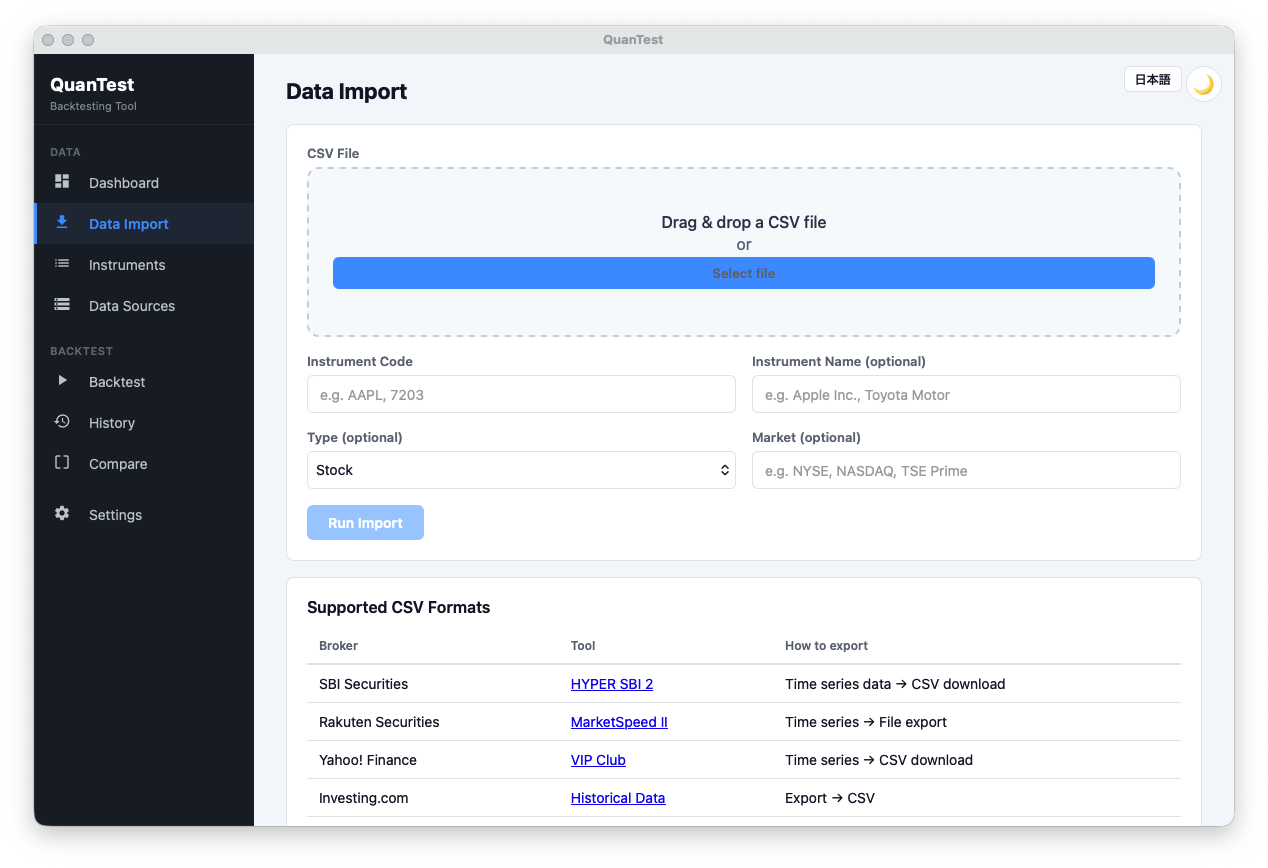
As shown above, drag and drop a CSV file to start the import. Ticker code (e.g., 7203 Toyota Motor) and market (Tokyo Prime, NYSE, NASDAQ, etc.) are optional fields — they can be left blank because QuanTest infers them from the CSV. The panel below lists the supported formats (SBI HYPER SBI 2 / Rakuten MarketSpeed II / Yahoo! JAPAN Finance VIP Club / Investing.com Historical Data), so once you’ve exported a CSV from your brokerage, your testing environment is ready to go.
If you’d like to try it, you only need one CSV to run a sample backtest.
Free · No signup · Data stays on your device
Tradeoffs of the CSV Approach
CSV import comes with constraints:
- No real-time data (snapshots at download time)
- Thinly-traded instruments and delisted stocks can be hard to source
- Data updates require re-downloading manually
These are tradeoffs with the local-first design. We prioritized giving users control over their data over real-time convenience.
Note that the difficulty of sourcing delisted stocks also affects backtest interpretation — see our piece on survivorship bias.
Try It in QuanTest
Once you’ve downloaded a CSV once, you can rerun any number of strategies against it, all on-device.
Pull a CSV from your brokerage and you can start testing immediately.
Free · No signup · Data stays on your device
Supported CSV formats and product specifications may change without notice. See the user guide for the latest information.