Setting Up and Running a Backtest
Opening the Backtest Setup Screen
Click “Backtest” in the left menu, or click “Set Up Backtest” on the post-import screen.
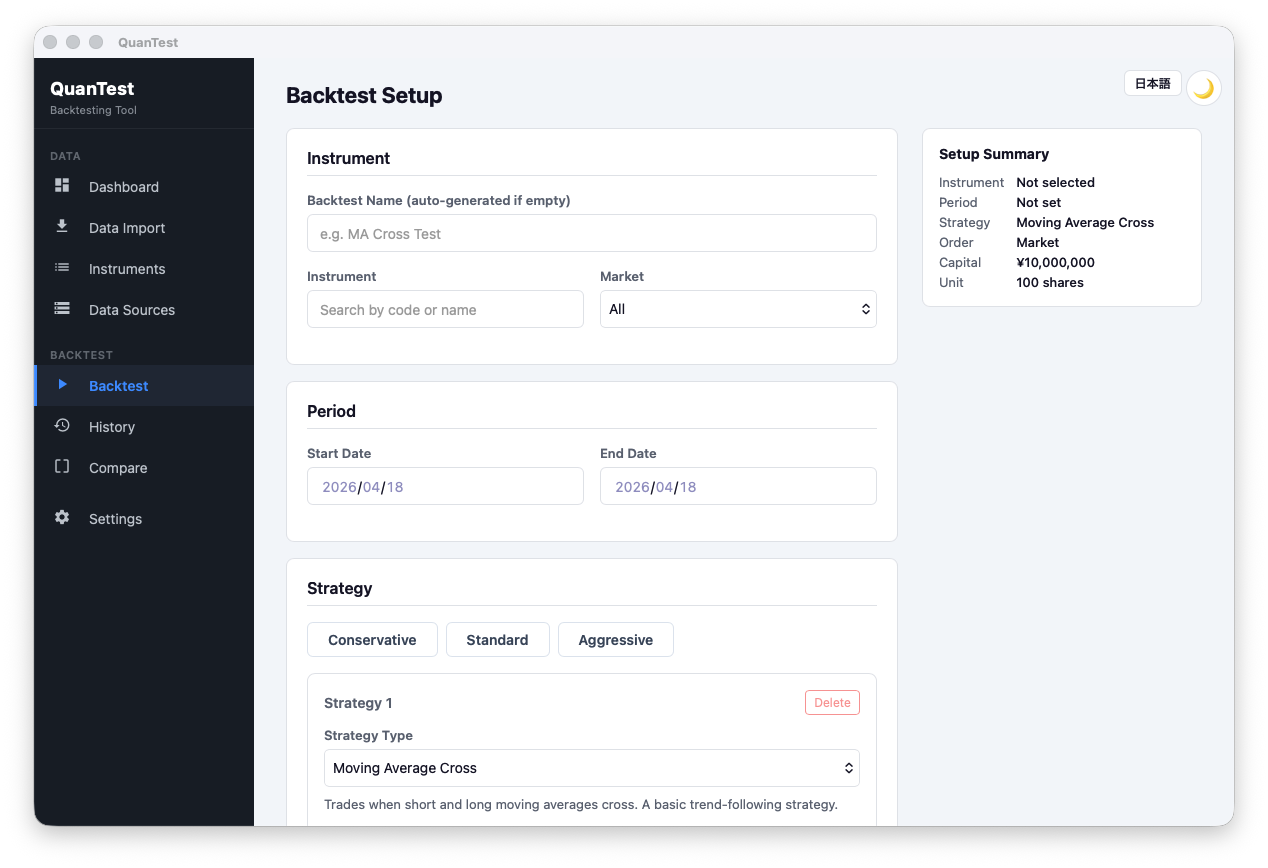
1. Instrument and Date Range
Instrument: Type a ticker or name in the search box and select the target instrument.
Backtest name: Leave blank to auto-generate from ticker, strategy, and start date.
Date range: Set the start and end dates within the range covered by your imported data.
2. Strategy Configuration
Using a Preset
Choose from Conservative / Standard / Aggressive. The preset fills in a strategy and its parameters automatically.
Configuring Manually
Click “Add Strategy” to select a strategy and enter its parameters. Up to 3 strategies can be used simultaneously.
See the Strategy Reference for details on each strategy.
Combining Multiple Strategies
When using more than one strategy, choose how their signals are combined.
| Mode | Behavior |
|---|---|
| All Match | Trade only when all strategies agree |
| Majority (recommended) | Trade when more than half of the strategies signal |
| Any | Trade when at least one strategy signals |
3. Execution Settings
| Field | Description |
|---|---|
| Order type | Market: fills at next day’s open. Limit / Stop: Pro only. |
| Lot size | Number of shares per order (trading unit). |
| Order expiry (days) | 0 = day order only. 1+ = valid for N days. |
| Allow short selling | When checked, sell signals open short positions. |
4. Capital Management
Initial Capital
Enter the starting capital for the simulation (e.g., 1,000,000 JPY).
Position Sizing
| Type | Description |
|---|---|
| All In | Uses the entire available balance for each purchase. |
| Fixed Shares | Buys a fixed number of shares (in lot size units) each time. |
| Fixed Amount | Buys a fixed dollar/yen amount each time. |
Fees and Slippage
- Commission rate: Percentage of the trade value (e.g., 0.1%)
- Minimum commission: Floor fee per trade (e.g., ¥100)
- Slippage rate: Assumed deviation from the target price (e.g., 0.1%)
Take Profit / Stop Loss
- Take Profit (TP): Close position when price rises by this % from entry. 0 = disabled.
- Stop Loss (SL): Close position when price falls by this % from entry. 0 = disabled.
5. Pre-Run Audit Panel
The Audit panel flags potential issues before you run.
| Warning | Action |
|---|---|
| Insufficient data | Shorten the date range or reduce strategy parameters. |
| Insufficient capital | Increase initial capital or reduce lot size. |
| High commission warning | Your commission rate may be unrealistically high. |
6. Run the Backtest
Click “Run Backtest”.
Processing runs asynchronously. When complete, the results screen opens automatically. You can cancel at any time using the Cancel button.